
Home » Download

JAY99 App Download: Fast Login, Live Cricket, and JILI Slots
Get the JAY99 mobile app fast with secure access built for local users
The JAY99 app download gives you quick entry, lighter data use, and fast updates on matchdays. Enjoy live cricket markets, JILI slots, and a cleaner layout built for one-hand use on mobile.
Security matters on mobile. The app supports two-step sign-in and clearly shows account-name match during payments for added confidence. Start safely from the JAY99 Official Link and add the icon to your home screen in minutes.
Why the JAY99 app is worth installing for speed, cricket, and slots
Stay close to the action with a mobile app designed for quick loading, easy taps, and trusted access. It keeps you updated while using less data on everyday networks.
Faster entry with one-tap login and trusted device memory
Save your device as trusted, enable biometric login, and get in with one tap. No typing loops, just quick access when you need it.
Live cricket center with quick odds, stats, and ball-by-ball updates
Track scores in real time, switch markets fast, and react during powerplays. The cricket hub keeps key info in one clean view.
JILI slots plus popular tables optimized for tap-first play
Spin JILI titles and browse other studios with smooth animations and fast loading. The lobby layout puts favorite games within thumb reach.
Data saver and smart caching for spotty connections on the go
Use low-data mode to reduce images and prefetch essentials. The app keeps going even when your signal dips.
Clear account-name match to build confidence during payments
See a clear name match before confirming a transaction. It’s a simple trust check every time you add or withdraw funds.
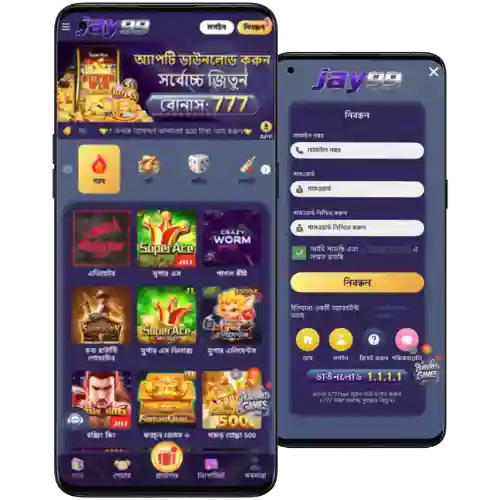
Step-by-step guide to download and install the JAY99 app on mobile
- Open the official site in your mobile browser.
- Choose Android for APK or iOS to add the web app icon.
- Android: Confirm you want the JAY99 apk file to begin download.
- Android: In Settings, allow Install unknown apps for your browser, then return.
- Android: Open the APK, tap Install, and wait for the setup to finish.
- iOS: Tap the Share icon in Safari, then select Add to Home Screen and confirm.
- Launch the app icon and allow notifications for offers and match updates.
- Use your JAY99 login or create a new account to continue.
- In Settings, enable in-app update checks to stay on the latest version.
Choose Android APK or iOS web app and start using JAY99 today
Android users: Tap “Get Android APK” to install the app directly. iOS users: Tap “Open iOS Web App” to add the icon for instant access. Both paths keep the interface quick and familiar for mobile.
Prefer an instant start? Use the JAY99 Download to get the latest build or add the iOS icon. This section also covers your second mention of the JAY99 app download as a friendly reminder.
Essential JAY99 app features for faster play, lighter data use, and control
- One-tap biometric login for quick entry on your trusted device.
- Cleaner menus and thumb-friendly navigation across all key sections.
- Live cricket hub with fast odds refresh and compact score views.
- Notifications for kickoffs, wickets, results, and special campaigns.
- Dedicated JILI slots lobby with quick filters and recent-favorite rows.
- Low-data mode to limit images and save bandwidth when on mobile data.
- Smart caching for faster reloads during peak match times.
- In-app update check to keep your build current without extra steps.
Exclusive in-app offers, reloads, and alerts tailored for mobile players
Turn on notifications to hear first about app-only reloads, cricket event boosters, and time-limited free spin drops on JILI titles.
Track your progress in one place and claim faster with simplified on-screen steps. For the latest offers, see the JAY99 bonus page from inside the app.
Expect seasonal campaigns around big series and finals. Alerts arrive early so you have time to opt in before odds and traffic surge.
Frequently asked questions about downloading, installing, and updating the JAY99 app
Where do I get the app safely?
Use the official site on mobile. Avoid third-party download links and stores that are not listed on the site.
Is the app in Google Play or the App Store?
Android is offered as a direct APK from the site. iOS works as a web app you can add to your Home Screen for instant access.
How do I install on Android if the APK is blocked?
Go to Settings and allow Install unknown apps for your browser. Return, open the file, and tap Install.
How do I add the app icon on iPhone?
Open the site in Safari, tap Share, choose Add to Home Screen, confirm the name, and the icon appears on your Home Screen.
How do I keep the app updated?
Open Settings in the app and run the update check. If a new build is listed, download and install, or re-add the iOS icon if prompted.
Ready to play faster on mobile with JAY99? Install the app now
Get in fast, track live cricket, and spin JILI slots with smoother performance. Keep notifications on so you never miss an offer or a wicket alert.
New to the platform? Create your account in minutes and verify your details for smoother play. Start now via JAY99 Register and make the most of the mobile experience.